Contains in-app purchases · Design & UI/UX
No reviews
Upvotes
Pricing
Verified
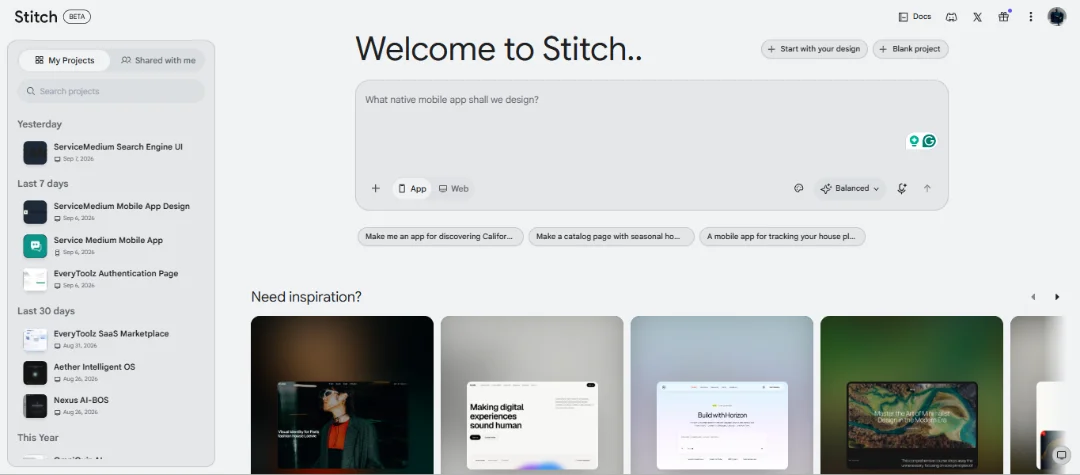
Google Stitch is an AI-powered design tool that turns natural language prompts into polished UI designs and app prototypes quickly.
Google Stitch
Google Stitch is an AI-powered interface design and prototyping tool designed to help users turn ideas, descriptions, and natural language prompts into functional-looking digital interfaces quickly. Instead of starting every project from a blank canvas and manually designing each screen, Stitch allows users to describe what they want and use AI to generate UI concepts that can be refined and iterated.
It is particularly useful for developers, designers, founders, product teams, marketers, and anyone who wants to move from an idea to a visual interface without spending hours creating an initial design from scratch.
Google Stitch brings AI into the UI and product design workflow. Users can describe an interface using natural language, such as a landing page, dashboard, mobile application, SaaS platform, ecommerce interface, or other digital product. Stitch can then transform the description into a visual interface concept.
The goal is to reduce the gap between an idea and its visual representation. Instead of explaining a product concept to a designer or manually creating wireframes first, users can experiment with different prompts and quickly see how an interface could look.
This makes Stitch useful during the early stages of product development, where teams often need to explore multiple layouts, visual directions, and user experiences before deciding on a final design.
One of the key capabilities of Stitch is AI-assisted interface generation. Users can provide a natural-language description of the interface they want, including the type of product, required sections, layout, content hierarchy, and overall design direction.
For example, a user could describe a modern SaaS dashboard with a sidebar navigation, analytics cards, charts, recent activity, and a responsive mobile layout. Instead of manually building the initial concept, Stitch can generate a starting point based on the description.
This makes experimentation significantly faster and allows users to explore multiple ideas without rebuilding every design manually.
Stitch is especially useful for rapid prototyping. Product teams can take an early idea and turn it into a visual prototype before investing significant development time.
A typical workflow can involve creating an initial screen, reviewing the generated interface, identifying what needs to change, and iterating on the design. This process allows teams to validate the general direction of a product before developers spend time implementing the complete application.
It can also be useful for presentations, product discussions, internal planning, MVP development, and client proposals.
AI-generated designs are not necessarily the final product. One of the strengths of an AI design workflow is the ability to experiment.
Users can try different descriptions, layouts, styles, navigation structures, and interface concepts to discover what works best. This is particularly valuable when a product has not yet established its visual identity or when multiple approaches need to be compared.
Instead of committing to the first design idea, teams can use Stitch as an exploration environment and gradually move toward a stronger interface concept.
Google Stitch can be valuable for both designers and developers.
Designers can use AI generation to quickly create starting points and explore concepts before refining the visual experience. Developers can use generated designs as a reference when planning the structure and appearance of an application.
For developers working independently, Stitch can also reduce the amount of time required to create an initial UI concept. A developer can describe the desired application and use the generated interface as a visual reference before implementing the actual frontend.
Stitch can be used to explore a wide range of digital products and interfaces, including:
SaaS dashboards
Landing pages
Web applications
Mobile app interfaces
Admin panels
Ecommerce experiences
Productivity applications
Marketing websites
Customer portals
Analytics dashboards
Internal business tools
MVP interfaces
This flexibility makes it useful across different stages of product development.
One of the biggest advantages of AI-assisted design tools is shortening the distance between product thinking and implementation.
A traditional workflow may require brainstorming, wireframing, creating high-fidelity designs, preparing design specifications, and then beginning frontend development. An AI-assisted workflow can help teams reach a visual concept much faster.
Stitch can therefore act as an early-stage bridge between product requirements and frontend implementation. The generated interface can be reviewed, modified, and used as a reference while building the production application.
Google Stitch is particularly useful for startup founders, indie developers, UI/UX designers, frontend developers, product managers, agencies, and students.
It can be especially helpful for people who have a clear product idea but do not want to spend significant time manually creating the first version of the interface.
For startups and small teams, faster prototyping can make it easier to test product ideas, communicate concepts with team members, and prepare an MVP.
The biggest benefit of Google Stitch is speed. It allows users to move from a written idea toward a visual interface much faster than a completely manual design process.
It does not eliminate the need for design thinking or frontend development. Instead, it provides an AI-assisted starting point that can accelerate ideation, experimentation, and prototyping.
For anyone building digital products, Stitch can be a useful addition to the modern AI-powered product development workflow.
Google Stitch is a powerful AI-assisted design and prototyping solution for turning product ideas into visual interface concepts. Its natural-language approach makes UI exploration more accessible, while its rapid generation workflow can save significant time during the early stages of product development.
Whether you are designing a SaaS product, planning a mobile application, building an MVP, preparing a client concept, or simply experimenting with UI ideas, Stitch can help you move from an abstract idea to a concrete visual direction faster.
For developers and product teams adopting AI-first workflows, Google Stitch represents an interesting step toward a future where product concepts, interface design, and development can become much more closely connected.
Updated on
Oct 10, 2026
Platform
Web Application
Pricing
freemium
Offered by
Safety starts with understanding how developers collect and protect your data. Security practices may vary based on your plan, features used, and region.
Data is encrypted in transit
Your sessions and requests use standard TLS/SSL encryption.
Verified by EveryToolz
Reviewed for genuine functionality, safe URLs, and security compliance.
Official developer website
Access and account management are hosted directly on the official site.
Share your feedback to help other creators and makers.
No reviews yet
Be the first member to review and rate stitch.
Authentic software experiences from verified developers and community users.
0 ratings
No community reviews yet.
Be the first to share feedback and help other developers!
 freemium
Upload a photo. Get scroll-stopping captions instantly.
 freemium
A next-generation AI assistant built for work and trained to be safe, accurate, and secure.
 freemium
The AI community building the future. Discover, share, and collaborate on models, datasets, and applications.
 freemium
A comprehensive generative AI platform giving creators granular control over asset generation, model training, and canvas editing.
 freemium
Updated by admin check
 freemium
An AI language model by OpenAI capable of generating human-like text.
 paid
paid
Run and fine-tune open-source models with a simple API. No machine learning experience required.